A menu of installed and available tests and all the details required to understand and use them.
Introduction - Use and Function
The Bella System automates and integrates sample preparation, nuclei acid amplification, and detection of the target sequence in simple or complex samples using real-time Polymerase Chain Reaction (PCR). The system is suited for in vitro diagnostic applications that require hands-off processing of patient samples (specimens) and provides both summarized and detailed test results data in tabular and graphic formats.
System components
GeneXpert cartridges
Bella System software
Workflow overview
Before you begin
Installation
Except when noted, the procedures in this chapter are for the Bella System administrator or equivalent personnel.
Package contents
Required materials for use with the system
Installing the Bella instrument
Starting the instrument
Labeling instrument
Defining users and permissions
Configuring the system
Verifying proper installation and setup
Managing assay definitions and lot-specific parameters
Restarting the system
Updating the system software
Principles of Operation
This is how Bella works.
System operation overview
Bella instrument
GeneXpert cartridge
I-CORE module
Heating and cooling mechanisms
Optical system
System calibration
Specifications
Specifications and performance characteristics.
Instrument classification
General specifications
Thermal performance parameters
Operational environmental parameters
Environmental conditions for storage and transport
Sound pressure
Electromagnetic compatibility certifications
Product safety certifications
Operating Instructions
This is how to use the Bella System to run an in vitro diagnostic (IVD) test and magage the results data.
Typical workflow
Getting started
Starting the Bella System
Checking the list of available assay definitions
Starting a test
Monitoring the test process
Stopping a test in progress
Viewing the test results
Editing the test information
Generating test result reports
Exporting the test results
Managing test results data
Running a Test
Open Door, Scan ID (Beep), Scan Sample (Beep), Scan and Load Cartridge (Beep), Push Door In.
Laboratory Information System
Detailed configuration instructions.
Calibration
You do not need to calibrate the Bella instrument. Cepheid performs all the necessary calibrations before you receive the system. However, Cepheid recommends that the instrument be recalibrated after 1 year of service from the previous calibration or at 1000 runs per instrument module, whichever comes first. See Service to determine the date or number of runs since the last calibration. To schedule a calibration, contact Cepheid Technical Support.
Quality Control
Internally the Bella system uses SPC, IC, and EC to internally validate each test.
External quality control
External control trend reports
Precautions and limitations
You should be aware of the following system procautions and limitations to ensure proper operation and results.
Laboratory
Before you install the Bella system, make sure your laboratory meets the environmental requirements in Specifications.
Instrument and software
Be sure to do the following:
Place the Bella instrument in a sheltered environment, because it is designed for indoor use only.
Provide at least 5 cm (2 in) of clearance on each side of the instrument to ensure adequate ventilation.
Connect the Bella instrument to a surge protector and properly grounded AC circuit. See Specifications for the electrical requirements.
Use the Bella instrument for in vitro diagnostic applications only.
While a test is in progress:
Do not move the instrument.
Do not run other software.
Cartridge
The GeneXpert Cartridges are designed for single use only. To prevent cross-contamination and biologically hazardout situations, use each cartridge only once.
Assay
For each test, be sure to follow the instructions in the assay-specific package insert for the test requirements.
Safety Hazards
It is imperative that you follow the precautions in this section for safe operation.
General safety precautions
Before you start to use the GeneXpert Dx System, make sure you read this operator manual entirely and are familiar with the safety information. Using controls, making adjustments, or performing procedures other than those specified in this manual can result in exposure to hazards that can cause injury or damage to the system.
Moving the instrument
The Bella instrument weighs 12 kg (26 lb). Do not attempt to lift the instrument without proper safety training and assistance.
Warning
Lifting or moving the instrument without proper training and assistance can cause personal injury, damage the instrument, and void your warranty.
Safety labels on the instrument
Label
Description
Electrical safety
Warning
Do not attempt to open or remove the instrument covers. Doing so can expose you to electrical hazards and cause injuries.
The Bella instrument enclosure is designed to protect you from electrical shock hazards. Under normal operating conditions, you are protected from electrical shock hazards.
Chemical safety
Follow your laboratory safety procedures for working with chemicals. Your laboratory should have all the equipment ordinarily required for the safety of individuals working with chemicals. The equipment includes fire extinguishers, first-aid equipment, safety shower, eye wash fountain, and spill cleanup equipment.
Biological hazard safety
Because the Bella System can be used to analyze infectious materials, you should follow your local, state or provincial, and national safety regulations for handling and disposing the samples. If you have questions or require safety training, check with your organization's safety or regulatory personnel.
Service
It only takes a few minutes to swap a module.
Replacing instrument parts
Repairing the instrument
Regular maintenance
Schedule and detailed instructions.
Maintenance tasks
Disinfecting instrument surfaces
Disinfecting the cartridge bay
Disinfecting the plunger rod
Calibrating the instrument
Preforming a self-test manually
Troubleshooting
Problem
Solution
Off
Turn instrument on.
On
Good.
Not working
Turn instrument off and on again.
Glossary
Term
Definition
.gxa file
an assay definition file.
.gxr file
a lot-specific parameter file.
.gxx file
an arhive file that contains multiple tests.
assay definition
a series of programmed steps to perform sample preparation, amplification, and detection procedures.
Bella
a Cepheid GeneXpert instrument with a built-in touch screen computer and G2 GX Modules with built-in barcode readers.
Cepheid
over a decade ago, Cepheid set the standard for innovation in automated molecular diagnostics — and we’ve never looked back. Today, even with the largest installed base of any molecular platform, Cepheid is constantly innovating and evolving its capabilities. The GeneXpert® System has been heralded as game-changing by healthcare leaders across the globe — enabling institutions of any size, from small medical clinics to high-volume reference laboratories and hospitals, to access the speed and accuracy of molecular diagnostics. Cepheid’s growing Xpert® test menu spans multiple clinical applications including healthcare-associated infections, sexual health, critical infectious disease, virology, and oncology.
cycle threshold (Ct)
the first cycle in which the fluorescence reaches a specified threshold. The C, can be determined by analyzing the growth curve (Primary Curve) or the second derivative of the growth curve (2nd Deriv).
data reduction
the process in which the system analyzes the raw data based on the settings in the assay definition to determine the test result.
endogenous control
a control (gene) taken from the test sample and used to normalize targets and to ensure sufficient sample is used in the test. Because of its low variability, the endogenous control can also be used to indicate sample-inhibitor contamination.
endpoint
the fluorescence reading for the last cycle of a thermal cycling protocol.
instrument module
an individual hardware component within which fluidic and thermocycling protocols occur. Each module consists of a bay for holding a cartridge, a syringe drive, a valve drive, an ultrasonic horn, and an I-CORE module.
GeneXpert
the GeneXpert® family of systems have set a new standard in workflow flexibility, 24/7 testing accuracy, and user-friendly design — delivered in an astonishingly beautiful and compact package.
The GeneXpert System is available in a two, four, 16, 48, or 80-module configuration. All have our proven GeneXpert module at their analytic heart, and use the same patented cartridge technology for every Xpert® test. In addition, our CLIA-Waived GeneXpert Xpress is available for front line access and control, anywhere you need it.
growth curve
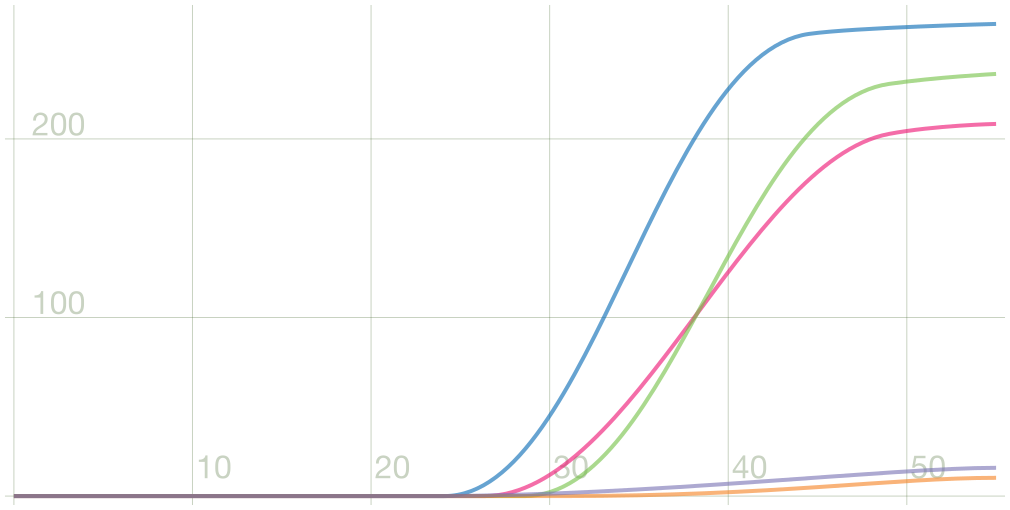
a graph that plots the number of PCR cycles against fluorescence detected. A real-time growth curve has three distinct phases: baseline, log-linear, and plateau. The increase in fluorescence is proportional to the amount of amplicon generated and can be used to define the cycle threshold.
internal control (IC)
a control that verifies the performance of the PCR reagents and prevents a false negative result. The internal control PCR assay assesses if there is any inhibition, possibly by components in the test sample. The internal control should be positive in a negative sample.
lot-specific parameters (LSP)
information about a reagent lot that is required by some assay definitions to determine the test results. The lot-specific parameters are included in the GeneXpert cartridge 2D bar codes and in the lot-specific parameter (.gxr) files.
module
see instrument module.
primary curve
a plot of fluorescence vs. cycle number. A real-time growth curve should have three distinct phases: baseline, log-linear and plateau. The increase in fluorescence is proportional to the amount of amplicon generated and can be-used-to define the cycle threshold.
probe check
a stage during the test that checks for the presence and the integrity of the labeled probes.
protocol
an assay command that defines the thermal cycling and optical data collection parameters for an assay.
quality control (QC)
tests run as required by your institution’s standard Quality Control (QC) procedures to confirm the consistency and accuracy of the operation of this instrument.
reporter
a fluorescent dye or dye complex used to detect specific amplification products.
sample processing control (SPC)
a control that ensures a sample was correctly processed. The sample-processing control is processed with the sample and its DNA is detected by a PC assay.
second derivative (2nd Deriv) growth curve
the rate of change of the primary growth curve slope. The highest peak of the second derivative growth curve represents the point of maximum curvature of the growth curve or the transition from background fluorescence to amplified product fluorescence. Analysis of the second derivative growth curve can be used to define cycle threshold.
site
see instrument module.
test
the laboratory process used to determine the presence of a substance and measure the amount of that substance. In the GeneXpert Dx System software, a test is a record of how a specimen is processed. The record includes the instrument module ID, the assay definition, sample ID, test type, and notes about the test.
test type
the sample that is designated as a specimen, positive control, or negative control in the test.
user experience (UX)
the user experience is how a user interacts with and experiences a product, system or service. It includes a person's perceptions of utility, ease of use, and efficiency. Improving user experience is important to most companies, designers, and creators when creating and refining products because negative user experience can diminish the use of the product and, therefore, any desired positive impacts; conversely, designing toward profitability often conflicts with ethical user experience objectives and even causes harm. User experience is subjective. However, the attributes that make up the user experience are objective.
About
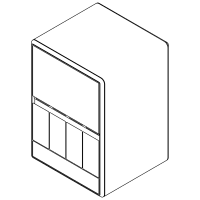
Bella instrument UX mockup created by Cepheid Innovation.